


Qustodio Parental Control App
3.61.33K Reviews
App Specs
- Version
- 182.38.1
- Updated On
- License
- Free
- Downloads
- 5,000,000+
- Developer
- Qustodio LLC
- Categories
- Parenting
- Platform
- Android, iOS
Screenshots
 Analysis by AppCompare
Shared devices can make family screen rules harder than they sound. A child might use a tablet for homework, a parent might pick it up to check a message, and a younger sibling may get their turn later. In that kind of household, I’d look at Qustodio Parental Control App as a way to make children’s device use more visible and give parents a starting point for setting boundaries—not as a substitute for agreeing on who uses which device and when.
Start by deciding whose activity you’re managing
Before changing any settings, I’d map out the devices each child actually uses and whether any are shared. That small bit of planning matters: a time limit or activity report is only useful if you can interpret whose use it reflects. If siblings take turns on one tablet, for example, a household rule about signing out or handing the device over at a set time may be just as important as the app’s controls.
I’d also decide which decisions should stay with the parent and which should be discussed with the child. Blocking a category, limiting time, and checking location are different kinds of oversight. Treating them as one blanket permission can lead to confusion or mistrust. A clear explanation—what you’ll monitor, why, and what you’ll do if a rule is reached—makes the tool easier to use fairly.
Use reports to start a conversation, not end one
Activity summaries are most helpful when they answer a practical question. Is a child spending more time on a particular app than the family expected? Are browsing habits changing? Those observations can help you choose a calm moment to talk rather than making a decision in the middle of an argument about screen time. I’d avoid treating a report as proof of intent: a long session could be schoolwork, a video left playing, or ordinary downtime.
One useful routine is to review the settings together after a change in schedule, such as the start of a school term or a new after-school activity. A limit that worked during holidays may not suit a homework-heavy week. This is also a chance to check that the rules still match the child’s age and responsibilities instead of leaving an old setup in place indefinitely.
Keeping a Watchful Eye
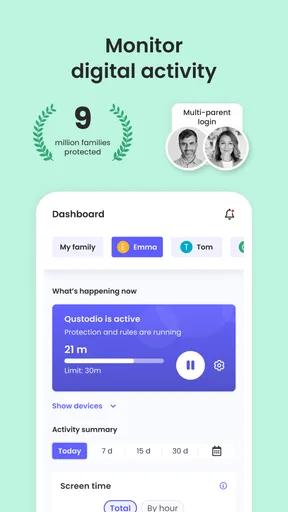
Qustodio Parental Control App offers a comprehensive suite of features that aim to give parents the control they need without being overly intrusive. The app allows you to monitor your child's activity across a range of devices, whether they're using a smartphone, tablet, or computer. With just a few taps, you can see which apps they're using, what websites they're visiting, and even how much time they're spending on each activity.
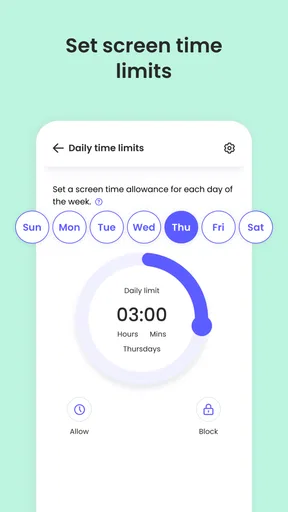
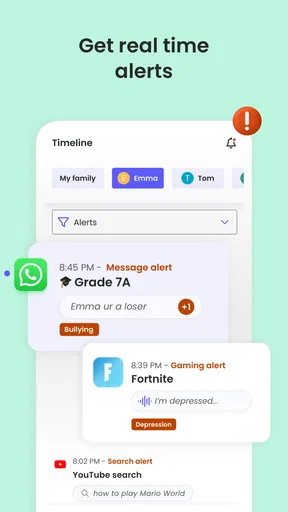
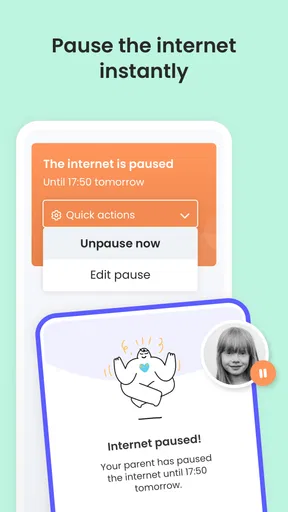
One of the standout features is the ability to set time limits for specific apps or the device as a whole. It's like having a built-in curfew that ensures your kids aren't glued to their screens all day. And if your little ones try to sneak in some extra screen time, don't worry—Qustodio has got your back with real-time alerts.
Worth Reading Before You Choose

Baby Panda World Brings Quick Play to Modern Phones, but Its Game Library Feels Busy

ESPN’s Live Game View Makes Following Close Games Easier

QuizzLand Review: A Good Fit for Short Trivia Breaks, Not Every Player

Basketball Stars: Multiplayer Is Fast, but Can It Recover When Matches Go Wrong?

WEBTOON Turns Phone Updates Into a Better Reading Routine

Link to Windows Runs on Shared Habits, Not Social Feeds
Filtering and Blocking Made Easy
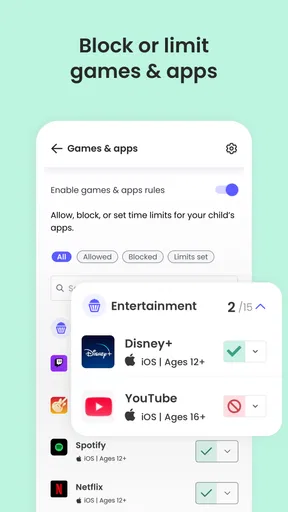
In a world where anything and everything is just a click away, having robust filtering options is crucial. Qustodio lets you block content based on categories like violence, gambling, and adult content. You can customize the filters to fit your family's needs, ensuring your kids have a safe browsing experience. It's like having a digital gatekeeper that works tirelessly to protect your children from inappropriate content.
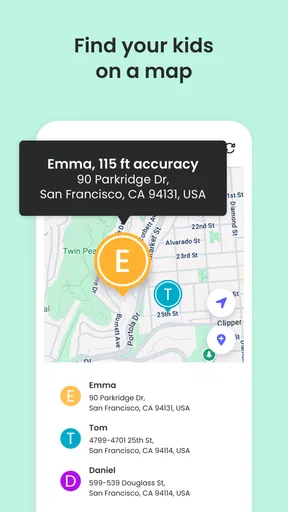
The app also offers location tracking, so you can keep tabs on where your kids are at any given moment. It's a feature that brings peace of mind, especially if your children are just starting to explore the world on their own.
Think about age, access, and trust
A child who is just beginning to use the internet needs different boundaries from a teenager who is learning to manage their own time. I’d use category blocking more firmly for a younger child, then revisit it as their judgment improves. For an older child, I’d explain which limits are safety rules and which are temporary habits you’re trying to change. The point is not to make every choice for them; it is to keep the rules understandable and proportionate.
Location tracking deserves its own conversation. It can be reassuring when a child is traveling independently, but it may feel intrusive if it is used to check every ordinary movement. I’d agree on when it is meant to help—such as confirming a child has arrived—and avoid turning it into a constant test of trust. The feature is most useful when everyone understands its purpose.
User-Friendly Interface
One of the things I appreciate about Qustodio is its intuitive, user-friendly interface. Setting up the app is a breeze, and the dashboard gives you a clear overview of all the important information. Whether you're a tech-savvy parent or someone who's still figuring out how to send a text, you'll find Qustodio easy to navigate.
The app also sends you detailed reports, so you can track your child's digital behavior over time. It's a great way to identify patterns and make informed decisions about their screen usage.
What the cost and alternatives mean in practice
The app is free to install, but it also offers in-app purchases priced from $34.99 to $137.95 per item. I’d check what is included in the option you’re considering before relying on a particular control, especially if you’re comparing it with built-in parental settings on a phone or tablet. Those built-in tools can be a sensible choice when you only need basic screen limits on one device. Qustodio is more relevant when you want a parent-focused view across a child’s online routines and need monitoring, web controls, and location in the same general toolkit.
There is a trade-off: a dedicated parental-control app asks for more setup and ongoing attention than simply switching on a device’s default family settings. It also works best when the child’s devices and household rules are clearly separated from adult use. If your main need is a simple bedtime reminder, a built-in timer may be enough. If you want a broader picture of app and web activity, the extra structure may be worthwhile.
A realistic weekday routine
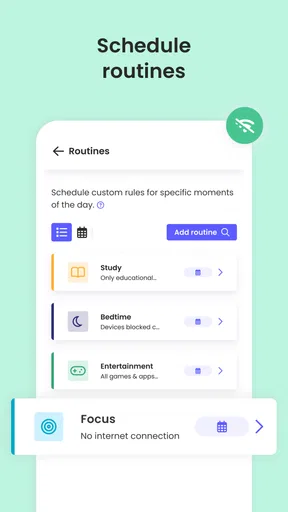
Imagine a child coming home, using a tablet for homework, then moving on to games while a parent is preparing dinner. I’d set the family’s expectations before that busy moment: when homework counts as necessary screen use, when leisure time starts, and what happens when the agreed limit is reached. Later, a quick look at the report can help answer whether the plan was realistic, rather than prompting a surprise confrontation while the child is still using the device.
For a shared tablet, I’d add a simple handover habit: the child tells a parent when they are finished, and the next user is clear. That won’t make every report perfectly meaningful, but it reduces the chance of blaming one child for another person’s activity. This kind of household routine is a practical companion to digital controls, not a feature I’d expect an app to replace.
In summary, Qustodio isn't just an app; it's a digital assistant that helps you manage your child's online world. It's not about spying or being a helicopter parent, but rather fostering a safe and balanced environment where kids can thrive in the digital age.
So, if you're looking for a way to stay connected to your child's digital life without hovering, Qustodio Parental Control App might just be the tool you need. It's like having a safety net that lets your kids explore while keeping them grounded. Give it a try and see how it can fit into your family's routine.
Who it suits—and when I’d pass
Qustodio is a strong fit for parents who want one place to review a child’s app and web activity, set limits, and consider location as part of a broader safety routine. It may also suit families whose children use more than one kind of device, since the app is designed to monitor activity across devices. Qustodio LLC develops the app, which sits in the parenting category and has a 3.6 average from around 21,000 ratings, with over 5 million installs.
I’d be more cautious if your household shares devices without separate user habits, or if your child is old enough to expect privacy but has not been included in the conversation. Monitoring can’t resolve disagreements about trust on its own. If you need only basic controls for a single device, the operating system’s built-in family tools may be simpler and less demanding to maintain. If your priority is a collaborative family calendar or a shared chore system, this is not the kind of app I’d choose for that job.
Set expectations before the first alert
Parents often wonder whether installing a control app will make screen-time disagreements disappear. I wouldn’t count on that. A limit can make a boundary more consistent, but families still need to decide what counts as reasonable use and how exceptions are handled. Talk through homework, travel, weekends, and special occasions before a notification or blocked session turns into the first discussion of the rules.
Another practical question is whether the app suits every child in the same household. I would avoid assuming that one set of limits fits siblings of different ages. Review each child’s needs separately, and make sure that a shared-device routine doesn’t blur whose activity is being discussed. When a report raises a concern, ask for context before changing a setting; that keeps monitoring from becoming a one-sided verdict.
Practical details before you install
The app is free, carries an Everyone age rating, and its current version is 182.32.0; it requires Android 7.0 or later. Its release date is September 30, 2020. Those details make it straightforward to check basic compatibility, but I’d still think first about the family’s actual goal: reducing late-night use, filtering web content, understanding app habits, or checking a child’s location. Choosing one primary purpose makes setup less overwhelming and gives you a clear way to judge whether the controls are helping.
My recommendation is to begin with a small number of boundaries, explain them openly, and revisit them after you see how they work in daily life. Qustodio is most convincing when it supports an agreed routine rather than quietly replacing one. If that balance sounds right for your family, it is worth considering; if your household needs only a basic timer or places a high priority on minimal monitoring, a simpler built-in option may feel more comfortable.
Pros
- User-friendly interface for easy navigation.
- Comprehensive activity monitoring features.
- Customizable screen time limits.
- Real-time location tracking available.
- Detailed reporting on app usage.
Cons
- Some features require a premium subscription.
- Real-time updates can occasionally lag.
- Compatibility issues with certain devices.
- Limited control over certain app functions.
- May affect device performance slightly.
FAQs for Qustodio Parental Control App
What features does Qustodio offer to help manage my child's device usage?
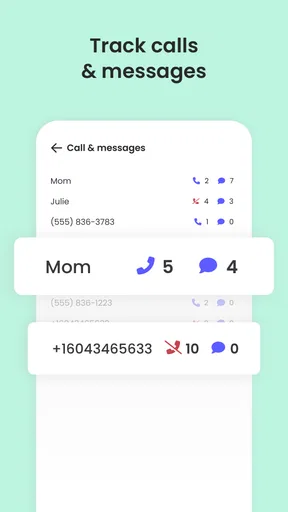
Qustodio provides a comprehensive suite of features designed to help parents manage their child's device usage. These include screen time scheduling, app blocking, website filtering, and location tracking. Additionally, the app offers detailed activity reports and the ability to monitor calls and messages on supported devices, ensuring parents stay informed about their child's online activities.
Is Qustodio compatible with both Android and iOS devices?
Yes, Qustodio is compatible with both Android and iOS devices, providing a seamless experience across different platforms. The app allows parents to manage multiple devices from a single dashboard, making it easier to monitor and control device usage regardless of the operating system. However, some features may vary slightly between platforms due to inherent OS restrictions.
How does Qustodio ensure my child's privacy and data security?
Qustodio takes privacy and data security seriously, employing encryption and secure servers to protect user data. Parents have control over the information collected and shared, and the app complies with data protection regulations. Additionally, Qustodio provides transparent policies about data usage, ensuring that your child's privacy is respected while using the app.
Can Qustodio help in monitoring my child's social media activities?
Yes, Qustodio can help parents monitor their child's social media activities. The app provides insights into time spent on social media apps and can block access to specific platforms if needed. While it may not provide detailed content monitoring for all social media, it offers an overview of usage patterns, helping parents manage and understand their child's online interactions.
Is there a free version of Qustodio available, and what are its limitations?
Qustodio offers a free version with basic features, such as screen time management and limited activity reporting. However, to access advanced features like detailed activity reports, social media monitoring, and multiple device management, a premium subscription is required. The premium version enhances the parental control experience, providing more comprehensive tools to ensure your child's online safety.


